Preview works fine for a quick merge of two files. For several files, a clear list and the same steps on any computer, StayPutPDF runs right in Safari — and nothing is uploaded, just like Preview.
Option 1: Preview, already on your Mac
Open the first PDF in Preview.
Show the thumbnails: View → Thumbnails.
Drag the other PDFs into the thumbnail sidebar, where you want them.
Save: File → Export as PDF.
It works, but it has rough edges: multi-page files are easy to drop in the wrong place, and reordering pages with a trackpad takes patience.
Option 2: StayPutPDF in Safari or Chrome
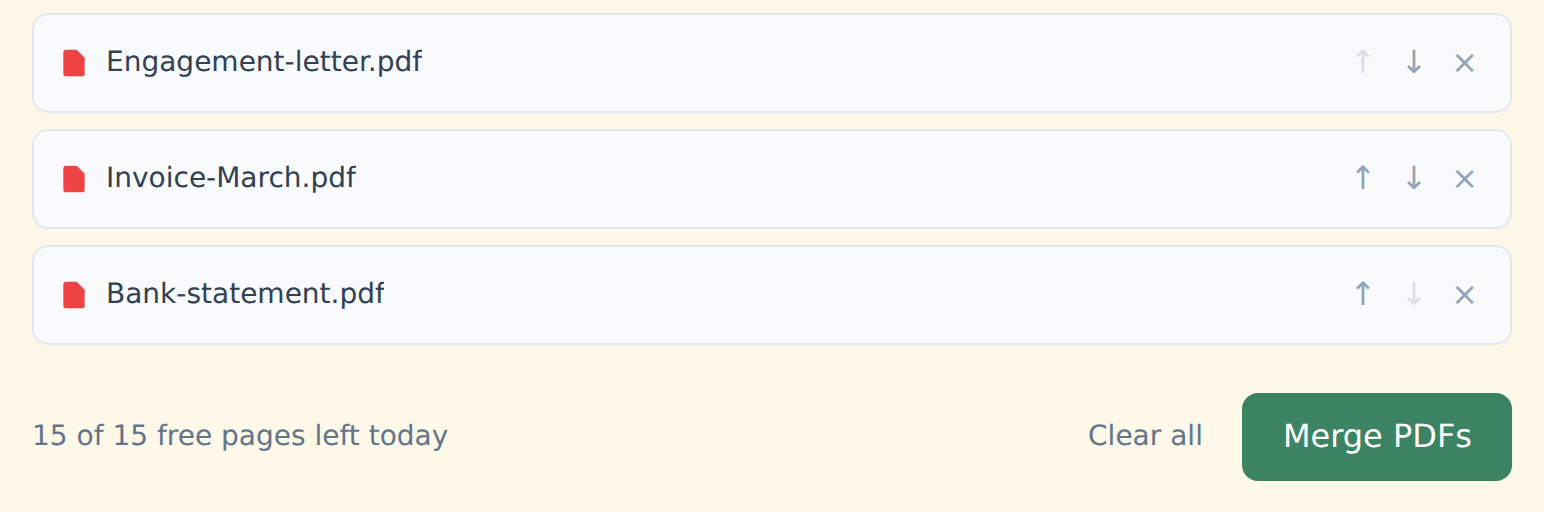
Drop all your PDFs into the box above at once.
Put them in order with the ↑ ↓ arrows — one line per file, easy to check.
Click "Merge PDFs" and download. No watermark, no account.
- Free, already on every Mac
- Good for two files
- Fiddly with many files
- Mac only
- Free, no upload, works in Safari
- Many files, clear list, simple arrows
- Same steps on Windows and phones
- Also redact, sign, edit and convert
Want it in your Dock?
In Safari choose File → Add to Dock. StayPutPDF then opens like a normal Mac app, in its own window. Your files still never leave your Mac — and it works offline either way, in the Dock app or in a Safari tab.
Free and Premium
15 pages a day
- Every tool except OCR — merge, split, organize, compress, redact, sign, edit, page numbers, protect, convert (incl. PDF to Word and JPG), extract text
- No watermark, no account, no email
- Counted across all tools; the count resets every day
$9/month
- No page limit on any tool
- OCR: make scanned PDFs searchable, 39 languages
- Your signature saved on this device (never uploaded), and your signature or initials on every page in one click
- Number a whole set of files in one go — plain or Bates, with an index
- One-click form filling with your saved details — name, address, email
- Or $69/year · $149 once, for life
Free or Premium, the tools work the same way: your files never leave your device.